
The interface should be invisible, and friction reduced to zero. But what would happen if we deliberately designed AI to... hinder a quick click and force the user to think?
This is exactly the experiment conducted by the Behavioural Insights Team (BIT), investigating the impact of large language models on human decision-making processes. The results of this study are an absolute must-read for anyone designing interactions between humans and machines.
BIT “How does LLM use affect decision-making?
How was the study conducted? meet pip and the 4 UX variants
In August 2025, 3,793 adults from the USA and the UK were recruited. They were presented with a series of scenarios testing popular cognitive traps (such as the sunk cost fallacy, the decoy effect, or moral dilemmas).
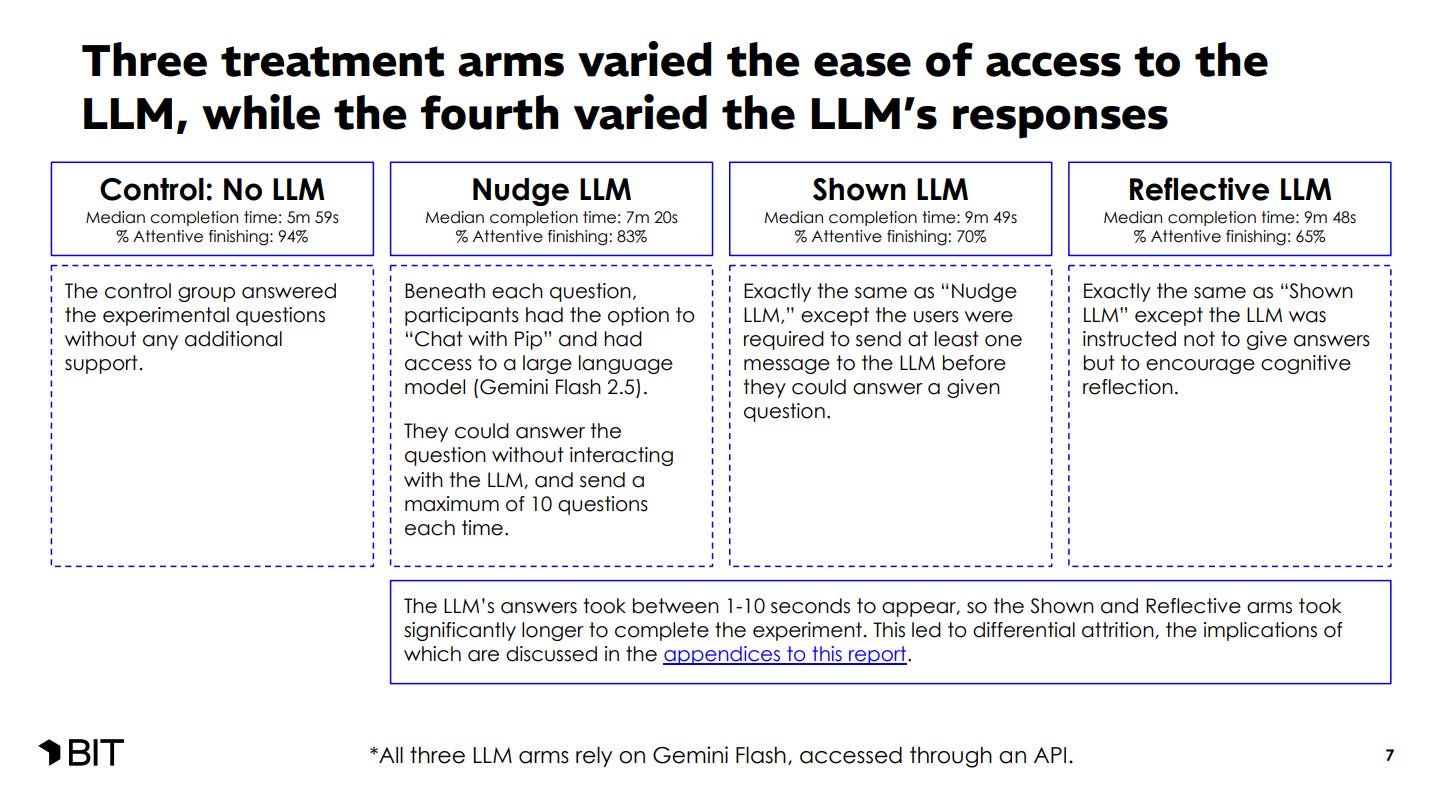
Participants were given an AI assistant named “Pip,” built on the Gemini Flash 2.5 model. To test how different interface designs affect people, participants were divided into four groups offering completely different user experiences:
- No LLM (Control group - no AI): Users had to manage on their own without support. They were the fastest (median time: 5 minutes and 59 seconds) and had the lowest abandonment rate - as many as 94% of them reached the end of the test.
- Nudge LLM (”Click for help”): Under each question, there was an option to “Chat with Pip.” Users could click and ask the model for advice, but it was not mandatory. Adding this option extended the median time to 7 minutes and 20 seconds, and the completion rate dropped to 83%.
- Shown LLM (Forced support): In this variant, “hard friction” was introduced. Users had to send at least one message to the LLM before the system allowed them to select an answer, and the AI provided ready-made, logical solutions. The time increased drastically (median: 9 minutes 49 seconds), and the completion rate fell to just 70%.
- Reflective LLM (Reflective AI): The interface was identical to the “Shown LLM” group - the user had to interact with the AI before making a decision, and the model responded with a delay of 1 to 10 seconds. The difference was under the hood: Pip was instructed not to provide ready-made answers, but to stimulate the user toward deeper reflection. This cognitively and time-demanding mode proved to be the biggest “conversion killer” - only 65% of participants completed the task.
What exactly is reflective LLM mode?
In this mode, the assistant took on the role of a “Reflective Guide,” whose mission was to help people reach their own conclusions. It used a technique called the “Art of Reflection.” When a user asked for help, the AI tossed the ball back, asking questions like:
- “What assumptions are we making here at the very beginning?”
- “What would this look like from another person’s point of view?”
- “This problem seems large. What small part could we focus on first?”
In this way, researchers wanted to check whether such support would protect us from “cognitive degradation” - that is, thoughtless reliance on ready-made machine answers.
The pros and cons of forcing the user to think
For us designers, the key is how users reacted to this interface. And they reacted… very differently.
- Where Reflective AI shone (Moral dilemmas): The Socratic questioning mode proved brilliant where there is no single, objectively correct answer. In the famous “trolley problem” test, the reflective AI led users to make much more consistent, utilitarian decisions.
- Where Reflective AI failed (Cognitive biases and numbers): Forcing people to reflect proved much worse at combating hard cognitive biases. In the case of the “anchoring effect,” the AI that displayed advice by default (Shown LLM) flattened the error almost to zero, while the Reflective mode helped very little.
UX nightmare: the price of reflection
This is where the BIT study brings the most important lesson for interaction designers. The Reflective LLM mode generated enormous costs on the User Experience side.
Model responses in this mode were generated with a delay of 1 to 10 seconds. Adding the requirement of harder mental work to this spiked the completion time and led to a massive drop in engagement. Moreover, the people who dropped out were not random - the dropout groups more often included younger people and those with higher incomes, i.e., the most busy target audience.
Main conclusions from the Behavioural Insights Team (BIT) study:
- AI effectively reduces our errors, but its design (UX) is key: Depending on how the AI was designed, the impact on decisions varies drastically. Ready-made advice (Shown LLM) proved extremely effective at reducing susceptibility to the sunk cost fallacy or the anchoring effect.
- Reflective mode supports consistency in moral judgment: Forcing users to think (Reflective LLM) worked great for moral dilemmas, helping participants maintain consistency in their values.
- Artificial intelligence does not teach us for the future (no transfer effect): When participants were denied access to AI, they returned to their old mistakes. No evidence was observed that AI support permanently teaches people better decision-making.
- Delays and forced interaction drastically destroy engagement (attrition): Waiting for a response and forcing effort caused the task completion rate to drop from 94% (no AI) to 65% (Reflective AI).
Recommendations for AI product creators and designers:
- Match the AI interface mode to the nature of the problem: For logic and numbers, use direct tips (Shown LLM). For coaching and ethical dilemmas, the reflective mode works better.
- Design with latency in mind to save retention: Remember that forcing a user to wait can lead to losing up to 35% of users. Use techniques to mask loading times.
- Treat AI as a permanent prosthesis, not an educator: Do not assume that AI will “cure” the user of cognitive biases. Products should provide constant, contextual support for every decision.
Designing interactions based on behavioral science: introducing behaviorai
Designing human-AI interaction shouldn’t start with the model, but with the user’s decision process. We need to understand when a user needs a quick answer and when they need a deliberate pause.
Context is everything: cognitive load, time pressure, and choice architecture determine whether AI helps or hinders. Theory alone is not enough; we need practical patterns that tell us when to add friction and when to remove it.
This is why BehaviorAI is being created. It’s not just a set of rules, but a library of design patterns rooted in behavioral science. It shows where an interface might reinforce a bias and where a well-placed question is more valuable than a fast answer.
